Yesterday version 2.6 of Arch Red Guest Server was released. Along the new release, the demo was also updated and upgraded significantly. Besides WWW interface, the RADIUS interface is now available for connecting one's own RADIUS gear to see how the guest accounts work.
The reason for bringing the RADIUS interface available is to have a way to demonstrate what is possible with Radiator. Serving basic authentication protocols, EAP for WPA and WPA2 and returning tags associated with guest accounts is just a small scratch on the surface, but should provide a good starting point. For example, all kinds of possibilities are available when utilising Guest Server's tag support.
Thanks go to Karri for suggesting the RADIUS demo!
Wednesday, May 13, 2009

Monday, April 27, 2009
Arch Red Guest Server v2.6 getting near completion
Lately I have been working on the next release of Arch Red Guest Server. Version 2.6 includes new features and enhancements requested by our customers. Some examples are:
The PDF label printing is also the first application of the new delivery framework, which offers a new interface for printing, mailing or using other methods such as SMS for delivering the account information to guests.
Guest names and event titles can now be any language and be mailed or printed without problems with garbled fonts. It does not matter where your guests come from, be it northern Europe or Japan for example, names and event titles display correctly leading to better customer satisfaction.
The user interface has been enchanced based on customer feedback. The workflow of adding guests is more streamlined and a number of other small enancements have been added.
For administrators the new version offers more configuration options for controlling the guest account creation and enhanced installer.
I will add more information and new demo showing the new version in a couple of days.
- Guest account printing to PDF labels (badges, stickers, etc.)
- Full internationalization support
- A number of user interface enhancements
- More configuration possibilities and controls for administrators
The PDF label printing is also the first application of the new delivery framework, which offers a new interface for printing, mailing or using other methods such as SMS for delivering the account information to guests.
Guest names and event titles can now be any language and be mailed or printed without problems with garbled fonts. It does not matter where your guests come from, be it northern Europe or Japan for example, names and event titles display correctly leading to better customer satisfaction.
The user interface has been enchanced based on customer feedback. The workflow of adding guests is more streamlined and a number of other small enancements have been added.
For administrators the new version offers more configuration options for controlling the guest account creation and enhanced installer.
I will add more information and new demo showing the new version in a couple of days.
Wednesday, March 4, 2009
Expanding VMware virtual disk for Linux
Recently we had to resize a VMware virtual machine disk. The original disk allocated for the virtual machine was only 8 GiB when it was noticed 32 GiB would have been desired. Luckily the virtual disk can be expanded with the VMware web interface or using the command line tools. Also, the Linux file systems, at least ext3, can be resized, so it is possible to resize virtual machines without having to reinstall.
A note of caution: What I describe belowed worked for me. I also took a backup from the virtual machine before doing any of the operations. There is no guarantee that this is the best, correct or even recommended way of doing the the resize.
About the terms I have used:
The first task was to expand the original 8 GiB virtual disk to 32 GiB. Here is what I did on the host:
Now that the VMware disk image has been resized, what does it look like from the guest operating system? Boot up the guest and check with fdisk command:
As one can see, the disk is now larger, but the Linux partition is still the same size as before resize.
The next steps are to expand the partition and its file system. In this case since we are resizing the root partition, the operation can not be done from the host operating itself. One method is to boot a live CD that contains the necessary tools.
Expanding the Linux partition and file system
For expanding the Linux partition and its file system, I decided to try GParted the Gnome Partition Editor which is conveniently available as a live CD.
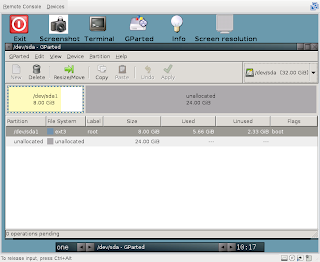
The main screen of GParted shows what the current configuration is. There is 8 GiB of allocated space for sda1 and 24 GiB space available for expansion.
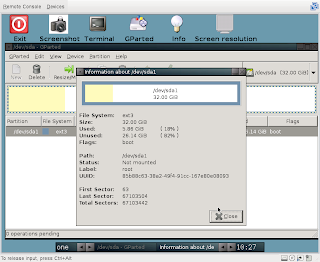
The resizing operation was simple. I clicked on "Resize/Move" to open a new window with a slider for moving and resizing the partition. I dragged the slider to cover the whole partition and clicked "Apply" from the main window. After the operation was completed, the partition was ready. Choosing "Partition -> Information" brings up this window:
The result
So did it work? Yes, just as expected.
After shutting the the GParted live CD and rebooting from the hard disk, everything was as expected. Host root file system was 32GiB, fdisk did not complain and no oddities were observed. Here are a couple of examples:
A note of caution: What I describe belowed worked for me. I also took a backup from the virtual machine before doing any of the operations. There is no guarantee that this is the best, correct or even recommended way of doing the the resize.
About the terms I have used:
- host is the physical server that runs VMware Server. In our case version 2.0
- guest is the virtual machine that runs on the host
The first task was to expand the original 8 GiB virtual disk to 32 GiB. Here is what I did on the host:
host% sudo /opt/vmware/bin/vmware-vdiskmanager -x 32GB devel.vmdk
Grow: 100% done.
Disk expansion completed successfully.

WARNING: If the virtual disk is partitioned, you must use a third-party
utility in the virtual machine to expand the size of the
partitions. For more information, see:
http://www.vmware.com/support/kb/enduser/std_adp.php?p_faqid=1647
Now that the VMware disk image has been resized, what does it look like from the guest operating system? Boot up the guest and check with fdisk command:
guest% sudo fdisk -l /dev/sda
Disk /dev/sda: 34.3 GB, 34359738368 bytes
255 heads, 63 sectors/track, 4177 cylinders
Units = cylinders of 16065 * 512 = 8225280 bytes
Disk identifier: 0x000df028

Device Boot      Start         End      Blocks   Id  System
/dev/sda1   *           1        1044     8385898+  83  Linux
As one can see, the disk is now larger, but the Linux partition is still the same size as before resize.
The next steps are to expand the partition and its file system. In this case since we are resizing the root partition, the operation can not be done from the host operating itself. One method is to boot a live CD that contains the necessary tools.
Expanding the Linux partition and file system
For expanding the Linux partition and its file system, I decided to try GParted the Gnome Partition Editor which is conveniently available as a live CD.

The main screen of GParted shows what the current configuration is. There is 8 GiB of allocated space for sda1 and 24 GiB space available for expansion.

The resizing operation was simple. I clicked on "Resize/Move" to open a new window with a slider for moving and resizing the partition. I dragged the slider to cover the whole partition and clicked "Apply" from the main window. After the operation was completed, the partition was ready. Choosing "Partition -> Information" brings up this window:
The result
So did it work? Yes, just as expected.
After shutting the the GParted live CD and rebooting from the hard disk, everything was as expected. Host root file system was 32GiB, fdisk did not complain and no oddities were observed. Here are a couple of examples:
host% df -h
Filesystem            Size  Used Avail Use% Mounted on
/dev/sda1              32G  5.7G   25G  19% /
[rest of the output removed]

host% sudo fdisk -l /dev/sda
Disk /dev/sda: 34.3 GB, 34359738368 bytes
255 heads, 63 sectors/track, 4177 cylinders
Units = cylinders of 16065 * 512 = 8225280 bytes
Disk identifier: 0x000df028

Device Boot      Start         End      Blocks   Id  System
/dev/sda1   *           1        4177    33551721   83  Linux
Thursday, February 12, 2009
RADIUS Roaming: Issues and Solutions presentation in the TREX 2009 seminar
In a moment I will have a presentation in a TREX Internet exchange point's seminar about RADIUS roaming and the issues and proposed solutions -- both current and the future prospects. The presentation covers the path from simple RADIUS usage to a more complex RADIUS roaming situation today.
The presentation is available here:
Karri Huhtanen, Arch Red Oy: RADIUS Roaming: Issues and Solutions
The presentation is available here:
Karri Huhtanen, Arch Red Oy: RADIUS Roaming: Issues and Solutions
Wednesday, July 9, 2008
Arch Red Guest Server online demo updated
Arch Red Guest Server's online demo has now been updated to a new software version supporting features that are included in in the new editions of Arch Red Guest Server. From now on all the improvements made for Arch Red Guest Server are also included in online demo, in order to receive feedback for interested users and prospective customers.
Ask for your pilot user credentials through our web form.
Ask for your pilot user credentials through our web form.
Wednesday, May 21, 2008
A Community Networks and Wireless Tampere presentation at TERENA Networking Conference 2008
As a part of my PhD studies and community networks related research I keep a presentation at Terena 2008 Networking Conference in 7B - Who is there? - eduroam session. The session is streamed to the network at 17:00-18:30 Finnish time (UTC+3) and can be watched in real time here. The topic of my presentation is: Utilising eduroam in building wireless community networks. The presentation will be archived and will be available also later in case you absolutely do not want to miss it. :)
Thursday, April 10, 2008
Arch Red and Cisco power the NORDUnet2008 WLAN network
Arch Red and Cisco Finland joined forces with CSC to provide an eduroam(tm) compatible WLAN guest network for NORDUnet2008 conference 7th -- 11th of April 2008 in Dipoli, Espoo, Finland. The network was designed by Arch Red and build with Cisco 4400 WLAN controller and 12 AP1130AG access points. This gave the conference participants a choice of WPA/WPA2-authenticated eduroam(tm) network as well as completely open WLAN for unsecured, easy guest access. In cooperation with CSC the WLAN network in conference also supported state-of-art network technologies like IPv6 and multicast with enough bandwidth in radio and fixed network for all conference participants and also for streaming services. Arch Red also provided the RADIUS connectivity to eduroam(tm) WLAN roaming community for secured international WiFi roaming access.
By utilising Arch Red expertise and Cisco hardware, creating and deploying this kind of conference network was efficient and a quick way to provide reliable 2.4Ghz and 4GHz WiFi wireless access for all conference participants quickly.
By utilising Arch Red expertise and Cisco hardware, creating and deploying this kind of conference network was efficient and a quick way to provide reliable 2.4Ghz and 4GHz WiFi wireless access for all conference participants quickly.
Subscribe to:
Posts (Atom)